Play without a capo
Lower the song by one or two semitones and follow the matching shapes at the same tempo.

Put on a song in Spotify, on YouTube, or wherever you listen on your Mac. ChordBlimey shows you which guitar chord to play, where to put your fingers, and when to switch.
No sign-up, no account. 7-day Pro trial, no card needed.Apple silicon · macOS 14.2 or later · Windows version planned


Keyboard Cat
@PickPanic 4 years ago
Fur Elise next?
@FretFred 2 years ago
Those paws can play.
Demo soundtrack · Paws on the Keys
● On air
Fret FM
101.7 FM
The Fret FM schedule
On air · Capo on the Fourth
Switch chords when they reach the line.
Up next D
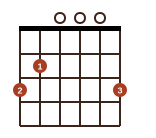
Numbers show fingers. ○ Open string. × Skip string.
Works with anything your Mac plays
No sign-up. Allow system audio access when macOS asks, so ChordBlimey can hear what your Mac plays. The audio stays on your Mac.
Play it in your usual music app or browser. ChordBlimey hears what your Mac plays.
Get your fingers ready as the next shape moves towards you. Switch chords when it reaches the line.
Live chords
Follow the shapes down the Highway and switch when they reach the line. Prefer a side-by-side view? Switch to Cards to see what to play now and what’s coming next.

Song sheet · Pro
ChordBlimey builds a sheet as it listens. Follow the highlighted bar to keep your place, especially when the verse comes round again.

ChordBlimey Pro
Reopen saved songs and their full chord sheets with your capo settings. Slow a tricky passage down to 85% speed while keeping the original pitch.

Lower the song by one or two semitones and follow the matching shapes at the same tempo.
Pin a compact chord window above your music player or browser.
Your Mac works out the chords locally. Your songs, chord sheets and corrections stay on your Mac and are not shared.

Who made it
Hi, I’m Ali. When I was learning guitar, I learned the most from playing along to songs I loved. Not drills, just the music I actually wanted to play.
ChordBlimey is the tool I wish I’d had then. Put on a song you love and the chords are there just before you need them.
Ali Smith, maker of ChordBlimey
No. There’s no sign-up, no account and no login. Download ChordBlimey, open it and put on a song. If you buy Pro, your licence key appears straight after checkout and Stripe emails you a link to it.
You need a Mac with Apple silicon and macOS 14.2 or later. A Windows version is planned for later.
Yes. ChordBlimey detects chords from audio your Mac plays, including Spotify, Apple Music, YouTube and internet radio. Track naming depends on the app, browser and available track information. You can still follow chords when the track name is unavailable.
Treat the chords as a guide. A clear guitar or piano part is easier to pick out than a busy mix or a quick run of changes. You can correct a chord in the song sheet if it sounds wrong.
You can keep playing on Free, with live chords for three songs a week. The allowance resets on Monday. A song counts once you’ve seen 45 seconds of its chords. The song sheet, your library, slow mode and lessons stay in Pro.
Yes. Yearly renews until you cancel, and Pro keeps working to the end of the year you paid for. Lifetime is a single payment with nothing to cancel. Full refund within 14 days of any payment, yearly or lifetime. Email support@chordblimey.com for either.
No. ChordBlimey works out the chords on your Mac. Your audio isn’t recorded or uploaded. Pro lessons written online send a song’s chords, title and artist, never audio, and you can switch that off. The privacy page has the details.

Free for three songs a week. No sign-up, no account.